Skip to content

How to make a WordPress website with Elementor in 2026, step by step: hosting, the Hello Elementor theme, the free Elementor plugin, your pages, header, footer and menu.


Quick summary
Elementor (free) + Hello Elementor
Quick answerTo make a WordPress website with Elementor, get hosting and a domain, install WordPress, add the free Hello Elementor theme and the free Elementor plugin (10M+ active installs, 4.5/5 on WordPress.org), then design each page by dragging widgets onto it. The free version is enough to build a full site. Elementor's paid plans add the Theme Builder for custom headers and footers, starting at $60/yr for Essential.
👍 Pros
- Free drag-and-drop page builder
- Live visual editing
- Huge library of templates and add-ons
- Works with almost any theme
👎 Cons
- Custom headers and footers need a paid plan or add-on
- Can get heavy if you add lots of add-ons
- The interface has a learning curve
Why I like it
- You see changes as you make them
- No code needed
- Easy to hand over to clients
WordPress.org data and elementor.com pricing, checked Nov 25, 2026.
Last updated: November 25, 2026
Hey, what's up, guys? Elementor is one of the most popular page builders for WordPress. It lets you design pages visually, by dragging and dropping, with no code.
In this tutorial I'll walk you through making a complete WordPress website with Elementor, from hosting to launch. If you'd rather use the default block editor, follow my main guide on how to make a WordPress website instead.

Step 1: Get a Domain and Hosting
Your website needs a domain name (like yourbusiness.com) and hosting to live on. I recommend Hostinger for beginners: WordPress installs in a few clicks, and the Premium plan includes a free domain for the first year. See my best WordPress hosting list for other options.
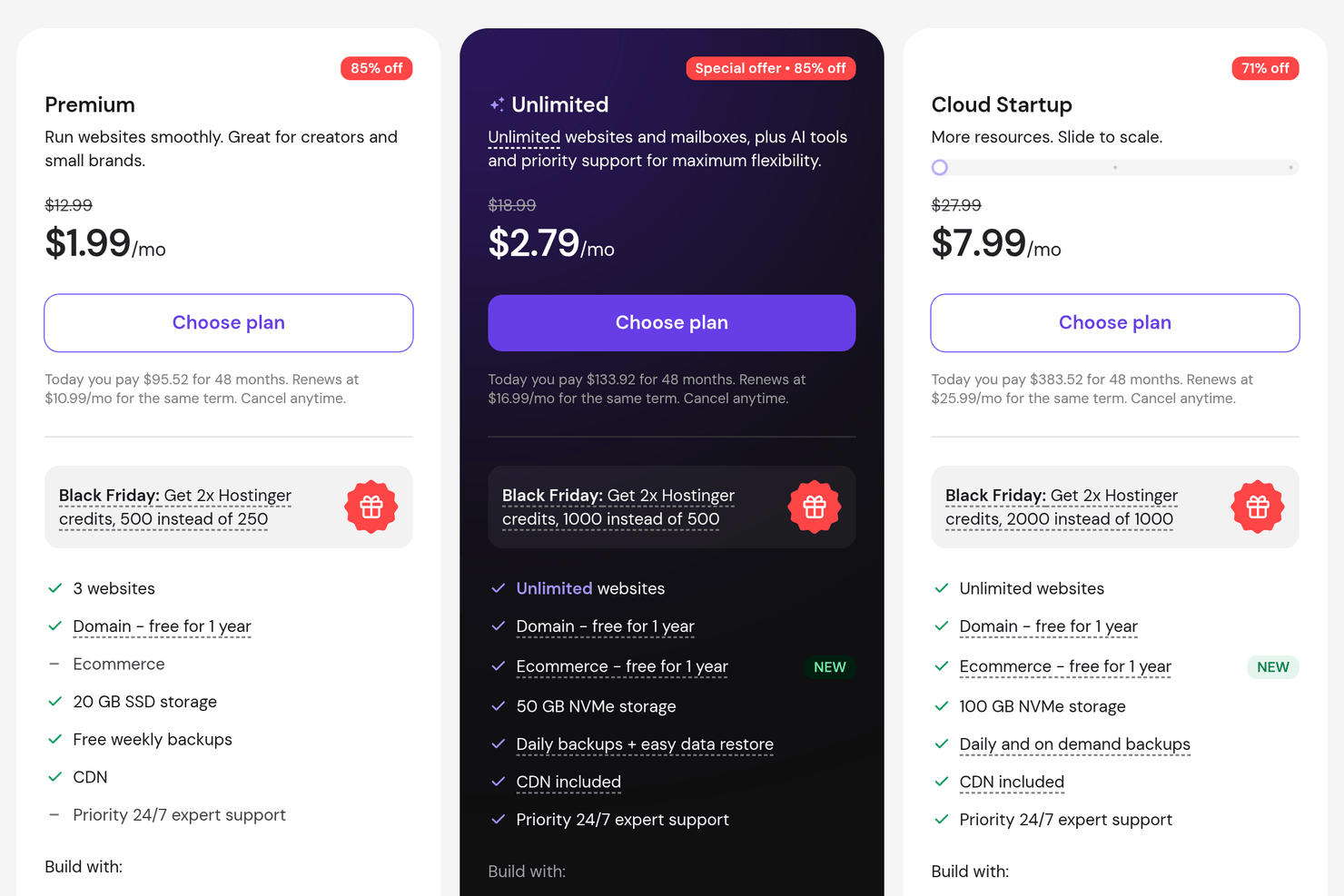
During setup, Hostinger offers to install WordPress for you. Pick a username and a strong password, and save them somewhere safe. Then log in to your dashboard at yourdomain.com/wp-admin.
Step 2: Install the Hello Elementor Theme
Elementor works with almost any theme, but Hello Elementor is a blank, lightweight theme made for it (1M+ active installs). It stays out of your way so Elementor controls the design.
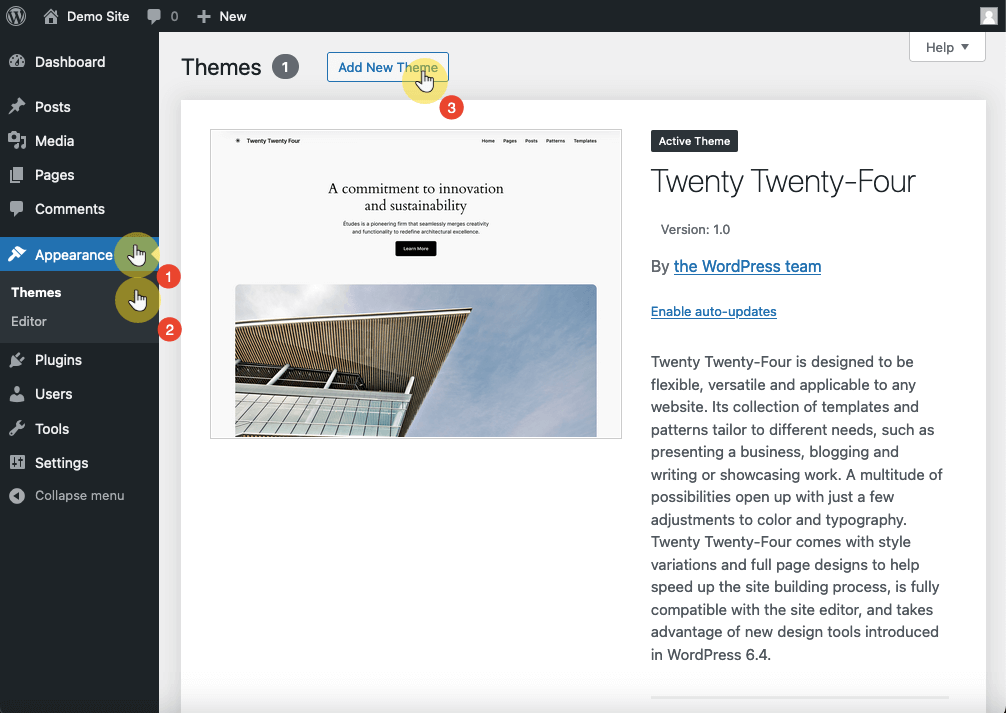

Step 3: Install Elementor (Free or Paid)
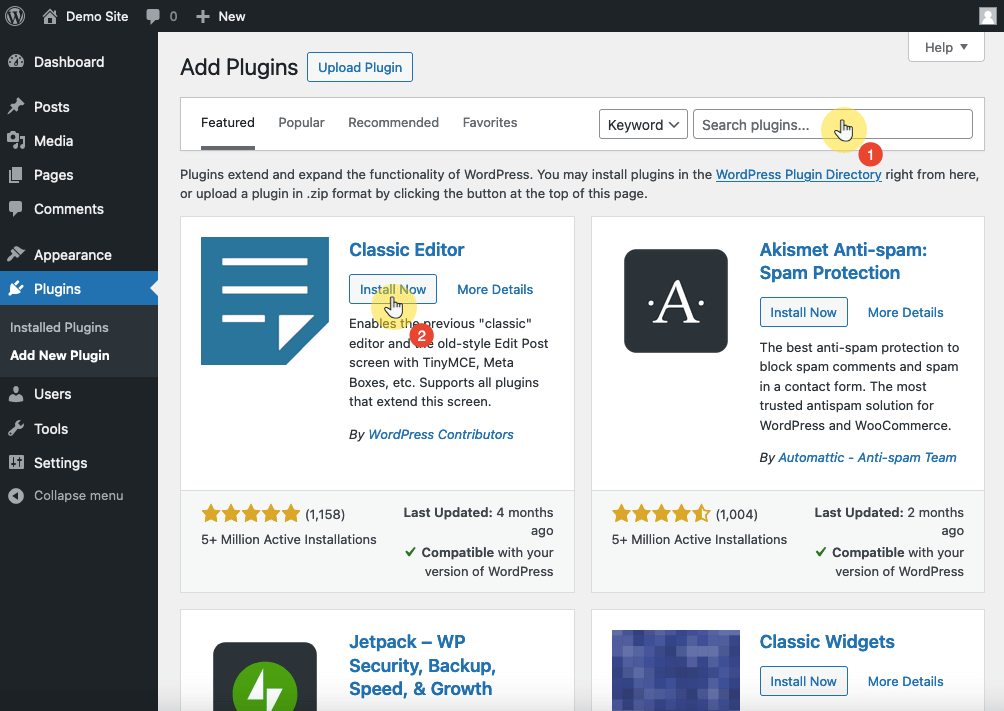
Go to Plugins → Add New Plugin, search for Elementor, then click Install and Activate. The free plugin covers the editor, dozens of widgets and templates. If you want to design your header, footer and blog templates with the Theme Builder, you'll need a paid plan.

| Plan | Price (Nov 25, 2026) | Sites | Highlights |
|---|---|---|---|
| Free | $0 | Unlimited | Editor, basic widgets, templates |
| Essential | $60/yr | 1 | Pro widgets, Theme Builder, forms |
| Advanced Solo | $76/yr in the sale (renews $84) | 1 | Adds Popup Builder, custom code, eCommerce |
| Advanced | $92/yr in the sale (renews $108) | 3 | Same as Advanced Solo on 3 sites |

Step 4: Create Your Pages With Elementor
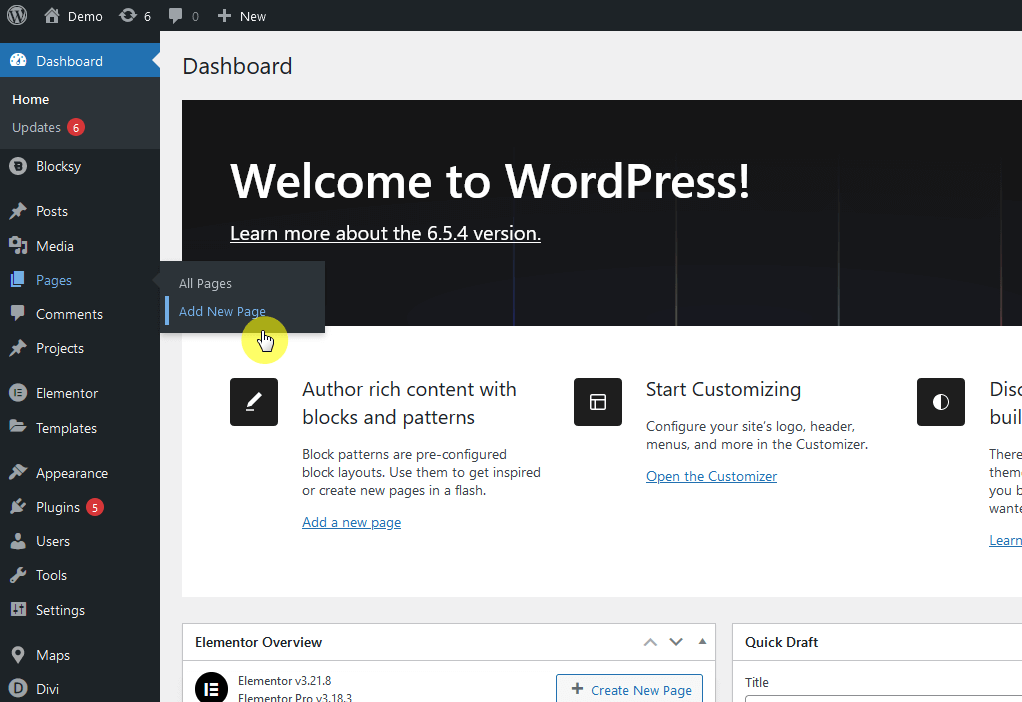
Make your main pages first: Home, About, Services and Contact. Go to Pages → Add New Page, give it a title and click Edit with Elementor.
- Add a container: containers are the boxes that hold your content.
- Drag in widgets: Heading, Text, Image, Button and more from the left panel.
- Style it: set colors, fonts and spacing in the panel, and check the tablet and mobile views.
- Save time with templates: insert a ready-made page or section from the template library.
Want a full design in minutes? Use a template kit. See my Elementor template kits and my list of free Elementor template kits.
Step 5: Build Your Header and Footer
With a paid plan, open Templates → Theme Builder and design a header and footer that show on every page. On the free version, the free Ultimate Addons for Elementor plugin (2M+ installs, 4.9/5) includes a header and footer builder. My best Elementor plugins list has more add-ons.
Step 6: Set Your Homepage, Menu and Launch
- Go to Settings → Reading and choose your Home page as the homepage.
- Go to Settings → Permalinks and pick Post name.
- Create your menu in your header (or Appearance → Menus) with your main pages.
- Check every page on your phone before you share it.
Planning to sell online? Follow my tutorial on how to create an eCommerce website with Elementor. Still comparing builders? See my best page builders for WordPress.
Black Friday deal
Start your Elementor website on Hostinger
WordPress hosting from $1.99/mo on a 48-month term with a free domain for the first year. Extra 10% off with DARREL10.
Code: DARREL10
Checked Nov 25, 2026. Renewals aren't discounted.
Elementor Website FAQ
Is Elementor free?
Yes. The Elementor plugin is free on WordPress.org. Paid plans start at $60/yr for Essential (checked November 25, 2026).
Which theme is best for Elementor?
Hello Elementor is the lightest choice because it's made for Elementor. Astra also works great.
Do I need Elementor Pro?
Not to build a site. You need a paid plan for the Theme Builder, forms and popups, or you can use free add-ons for some of those.
Is Elementor good for beginners?
Yes. You see your design as you build it, and there are lots of templates to start from.
Can I build an online store with Elementor?
Yes. Use WooCommerce for the store. Elementor's eCommerce widgets start on the Advanced Solo plan.

About the author
Darrel Wilson is a certified web hosting expert with more than 10 years of experience, an AI expert with more than 5 years of experience, a developer who understands AI, and a full-time content creator on YouTube covering these topics.
Affiliate disclosure: Some links in this post are affiliate links, including Elementor and Hostinger. If you buy through them, I may earn a commission at no extra cost to you. Elementor and Hello Elementor are free on WordPress.org, and I only recommend tools I think are worth using.
Elementor Essential
$60/yr for 1 site
Why I pick it
- Theme Builder for headers and footers
- Pro widgets and forms
- 30-day money-back guarantee
Advanced Solo is $76/yr in the Black Friday sale. From elementor.com, Nov 25, 2026.