Skip to content

How to upload an Elementor template to WordPress in 2026: import a .json or .zip file, insert it on a page, and apply a full website template, step by step.


Quick summary
Upload an Elementor template (quick answer)
Quick answerTo upload an Elementor template, go to Elementor → Templates → Saved Templates, click Import Templates, choose your .json file (or a .zip of templates) and click Import Now. Then open any page with Elementor, click the folder icon and insert it from My Templates. For a full site kit, use Elementor → Tools → Website Templates instead.
👍 Pros
- Works in free Elementor
- Takes about a minute
- Reuse designs across sites
- Imports .json or .zip files
👎 Cons
- Pro templates need a paid Elementor plan
- Images may point to the old site until you replace them
- Large .zip files can hit upload limits
Why it's easy
- No code needed
- Same steps for any template file
- Easy to undo: just delete the template
Steps checked in Elementor 4 on WordPress Playground, Nov 25, 2026.
Last updated: November 25, 2026
Hey, what's up, guys? Got an Elementor template file and not sure what to do with it? Uploading it takes about a minute once you know where the button is.
In this tutorial I'll show you how to import a single template, how to use it on a page, and how to apply a full website template kit. New to Elementor? Start with my tutorial on how to make a WordPress website with Elementor.
What Is an Elementor Template?
An Elementor template is a saved design you can reuse: a full page, a section, a header, a popup or even a whole website. Templates are usually shared as a .json file (one template) or a .zip file (several templates or a full kit).

- Page and section templates work in free Elementor.
- Theme Builder templates (headers, footers, single post layouts) and popups need a paid Elementor plan.
- Website templates (full kits) include pages, theme parts and site settings in one .zip.
Before You Start
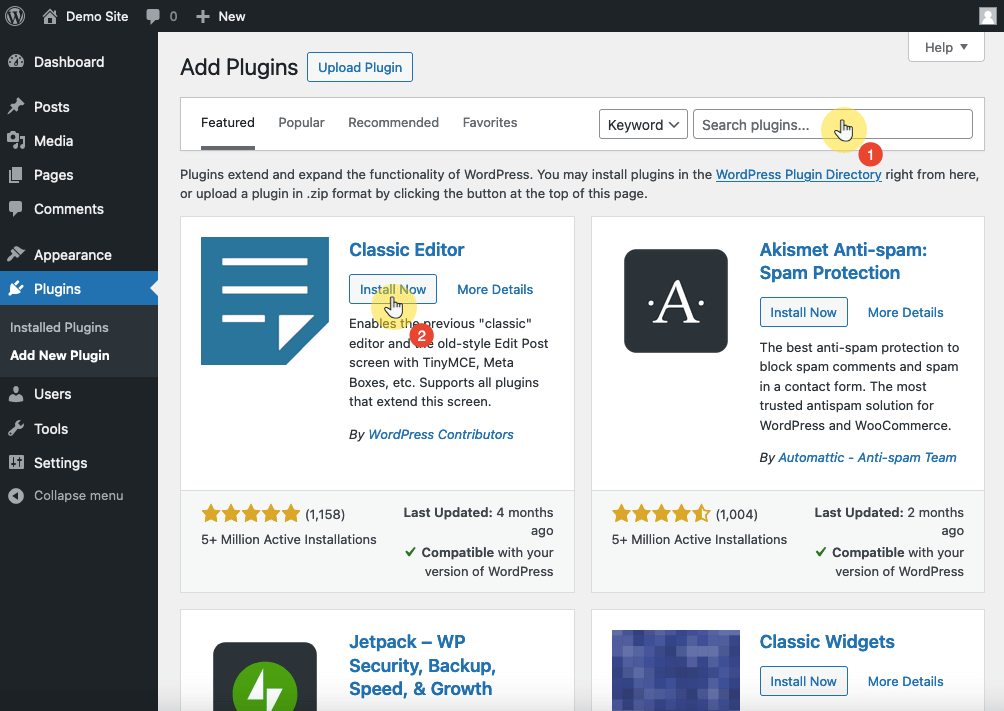
Make sure WordPress and the Elementor plugin are installed and up to date. Go to Plugins → Add New Plugin, search for Elementor, then Install and Activate. The free plugin has 10M+ active installs and a 4.5/5 rating on WordPress.org.
If your template was made with Elementor Pro widgets, you'll need a paid Elementor plan for those parts to show. Essential starts at $60/yr on elementor.com. Some templates also need add-ons, so check the template's notes. My best Elementor plugins list covers the popular ones.
How to Upload an Elementor Template (Step by Step)

- In your WordPress dashboard, go to Elementor → Templates → Saved Templates.
- Click Import Templates at the top of the screen.
- Click Choose File and select your .json or .zip file.
- Click Import Now. Your template shows up in the Saved Templates list.
If you get an upload error, your file may be bigger than your host's upload limit, or it may be a full kit rather than a single template. Full kits go through Website Templates (below).
How to Use the Template on a Page
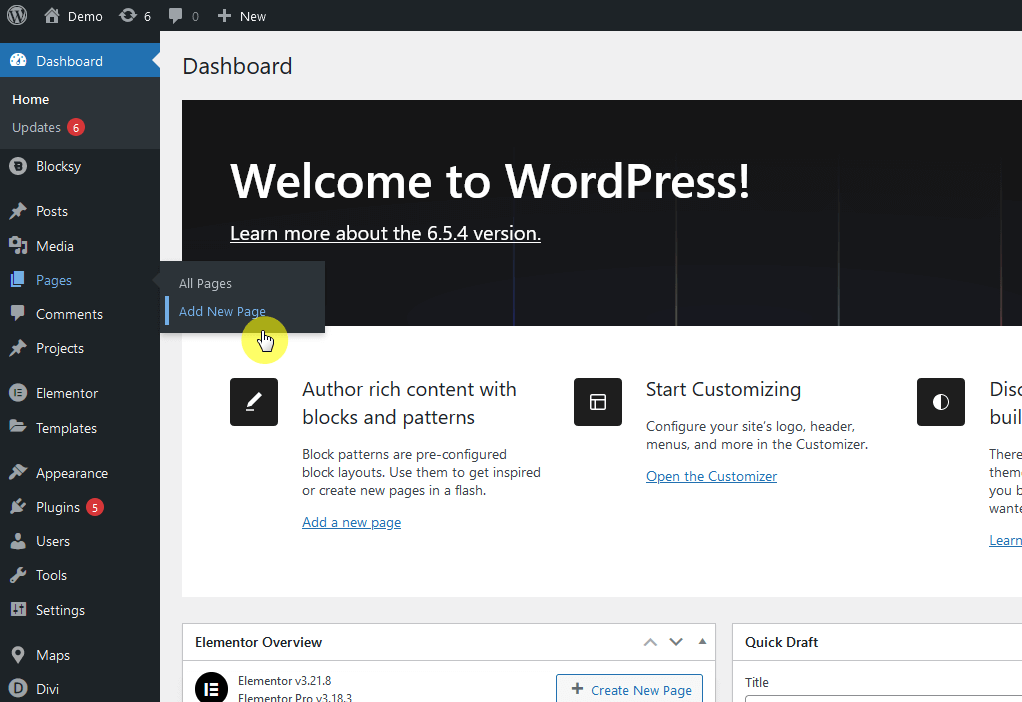
- Go to Pages → Add New Page (or open an existing page) and click Edit with Elementor.
- Click the folder icon (Add Template) in the editor.
- Open the My Templates tab and click Insert next to your template.
- Replace the text, images and colors with your own, then click Publish.
How to Import a Full Website Template (Kit)
A website template (Elementor used to call these kits) sets up your whole site at once: pages, header, footer and global colors and fonts. In Elementor 4, go to Elementor → Tools → Website Templates, find Apply a Website Template, click Import and upload the .zip file. You can also export your own site from the same screen.

Applying a website template can overwrite your site settings, so try it on a new or staging site first, and back up before you import on a live site.
Looking for kits to try? Browse my Elementor template kits or grab one of my free Elementor template kits.

Black Friday deal
Start your Elementor website on Hostinger
WordPress hosting from $1.99/mo on a 48-month term with a free domain for the first year. Extra 10% off with DARREL10.
Code: DARREL10
Checked Nov 25, 2026. Renewals aren't discounted.
Upload Elementor Template FAQ
Can I upload Elementor templates with the free version?
Yes. Saved Templates → Import Templates works in free Elementor. Templates that use Pro widgets or the Theme Builder need a paid plan to display fully.
What file types can I import into Elementor?
A single template is a .json file. A .zip can hold several templates or a full website template.
Where do imported templates go?
Single templates appear in Elementor → Templates → Saved Templates, and in the My Templates tab inside the editor.
Why won't my Elementor template upload?
The most common causes are a file over your host's upload limit, a full kit uploaded as a single template, or an outdated Elementor version.
How do I export an Elementor template?
In Saved Templates, hover over a template and click Export Template to download it as a .json file.

About the author
Darrel Wilson is a certified web hosting expert with more than 10 years of experience, an AI expert with more than 5 years of experience, a developer who understands AI, and a full-time content creator on YouTube covering these topics.
Affiliate disclosure: The template kits mentioned in this post are my own products, sold on darrelwilson.com. Some other links are affiliate links, including Elementor and Hostinger. If you buy through them, I may earn a commission at no extra cost to you. The Elementor plugin is free on WordPress.org.
All Access Lifetime
$149one time (Cyber Monday)
What you get
- 520+ Elementor Pro kits
- Unlimited sites
- Lifetime updates
Normally $199. From darrelwilson.com, Nov 25, 2026.